Create an impressiveand professional CV Template
Create a quick and completely free CV template for your new journey. With just a few simple steps, you can create yourself a professional CV and easily catch the 'Green Eyes' of Employers.


You need suggestions for starting a new CV?
Let's look at ready-made CVs from many different industries to get the best CV!
View All CV templates


Free CV templates: benefits and how to use them well
Many job seekers are surprised by how many CV templates there are online, and even more surprised to learn how many different kinds exist! In this article, let's explore everything you need to know about CV templates and how to choose the best one for your job search. Ready? Let's get started.
What is a CV, and what is a CV template?
CV is short for Curriculum Vitae: a brief summary of a person's education, qualifications and work experience, usually sent together with a cover letter. A CV template is a document that gives you a framework for writing your own CV. It makes the writing easier and gives your CV the professional look it needs. There are many kinds of CV template, and you should pick the one that suits the job you are applying for.
Common types of CV template
Reverse-chronological CV
This type of CV lists your information in reverse chronological order, starting with the most recent. It suits candidates with several years of work experience and no long gaps between jobs, or anyone who wants to show how their career has progressed over time.
Functional or skills-based CV
This type of CV focuses on your skills, abilities and personal qualities rather than your jobs. It suits students, recent graduates and young people with little or no work experience.
Combination CV
This type of CV combines the reverse-chronological and the functional CV.
Why use a CV template
Send more applications in less time
The more applications you send, the better your chances of being hired, right? A CV template helps you do that quickly. If you are applying for the same position at several companies, a template saves you time, because you do not have to write a completely new CV for every job. Each company will have different requirements, but you can easily adjust your CV to match the job description.
Remember what to include
Employers expect to see certain sections in a CV. Leave one of them out and your CV risks being passed over. A CV template, especially one designed for the position you are applying for, reminds you which sections to include, so you give the employer all the information they want.
Stand out from other candidates
There's no harm in learning from effective CV templates. Pick successful ones, work out why they work, then apply that to your own CV. Of course, don't copy them word for word: adapt them to yourself. Take the tips and the key sections and create a CV that is your own.
How to use a CV template
Choose the right template
From the templates available, choose one that suits the job you want and reflects who you are.
Fill in your details
Add your information to each section of the CV: contact details, education, work experience, skills and interests. You can borrow the wording of the sample CV, but the information must be accurate and your own.
Check for mistakes
Read it again and check the spelling. Spelling mistakes make a CV look unprofessional! Finally, save the file as a PDF.
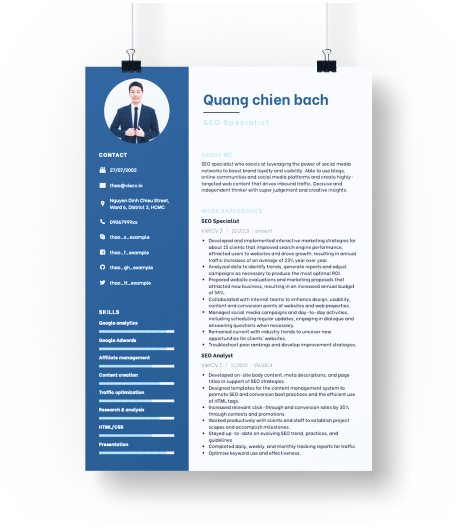
Tips for writing a CV from a template
Even with a template, it is worth reading a few tips on writing a CV to get the best results.

Use active language
When describing past work experience, use strong verbs such as “Achieved”, “Earned” and “Completed”. For example: Exceeded sales targets by more than 15%.

Make it stand out
Employers receive a lot of applications, so you have only about 2 minutes to catch their attention. Some ways to do that: put your most relevant experience first, regardless of when it happened, and put the important parts in bold.

Use numbers and achievements
Have you heard the saying “A picture is worth a thousand words”? On a CV, numbers are worth as much. For example: “Consistently exceeded sales targets by 10%”, or “Raised more than 200 million dong for the ABC fundraising campaign”…

Add keywords that “match” the job description
Have you noticed that job descriptions are full of common words and keywords about skills or required software? Employers scan CVs to see whether you “match” any of them. So do not forget to add the keywords that apply to you in sections such as skills and work experience.
How to email your CV the right way
Look through the CV templates, make a CV in your own style, and the last step is emailing it to the employer. Here is a quick guide to sending your CV by email professionally.
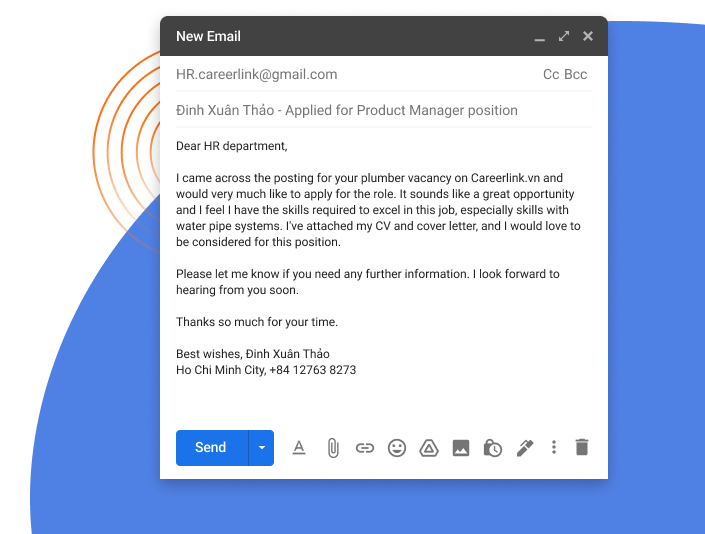
01Subject line
Make clear which position you are applying for by putting your full name, the job title and the field in the subject line, for example: Nguyen Van A - Application for Sales Executive.
02Email body
Do not forget to greet the employer. A simple “Dear Sir/Madam…” or “Dear Hiring Manager…” is enough.
Then open the email with a sentence such as “I am writing to apply for the [job title] position advertised on [website/social media].”
Importantly, do not paste your cover letter into the email. Use a simple font (such as Arial or Calibri 11) and skip special colours and fancy formatting. Close the body with “Best regards”.
03Signing off
End the email with your contact details: full name, email address and phone number. You can include a link (URL) to your LinkedIn profile and to other social media accounts you use professionally.
04Attaching your CV
- Use your full name as the file name.
- You can send your CV and cover letter as Word documents or as PDFs.

As always, do not forget to review and edit before you press send. Great CV templates, with content presented carefully in both your CV and your email, will help you land the job you have been dreaming of.